AI in Microsoft Word for Law Firms: Faster Drafting, Smarter Reviews, Better Reports
How a purpose-built AI Word add-in helps legal teams draft contracts, review clauses, and generate reports in a fraction of the time — without their work ever leaving the document.
Introduction
Ask any associate what eats their week and the answer rarely changes: drafting the same clauses again, hunting for the one defined term that was mistyped on page 34, and turning a 60-page agreement into a two-paragraph summary a partner will actually read. It is careful, important work — and a lot of it is repetitive.
That is exactly the kind of work AI is good at assisting with. Not replacing a lawyer’s judgement — no one wants that — but taking the first pass, catching the obvious, and handing back time. And because legal teams practically live in Microsoft Word, the most natural place for that help to appear is right inside the document, as a Word add-in.
The Real Cost of Manual Legal Drafting
Copy-pasting a clause library into every new agreement is slow, but the bigger risk is quiet inconsistency: a liability cap that no longer matches the recitals, a party name that changes halfway through, a governing-law clause left over from a different template. These slip past tired eyes at 9pm, and they are precisely what clients and opposing counsel pounce on.
Where AI Actually Helps
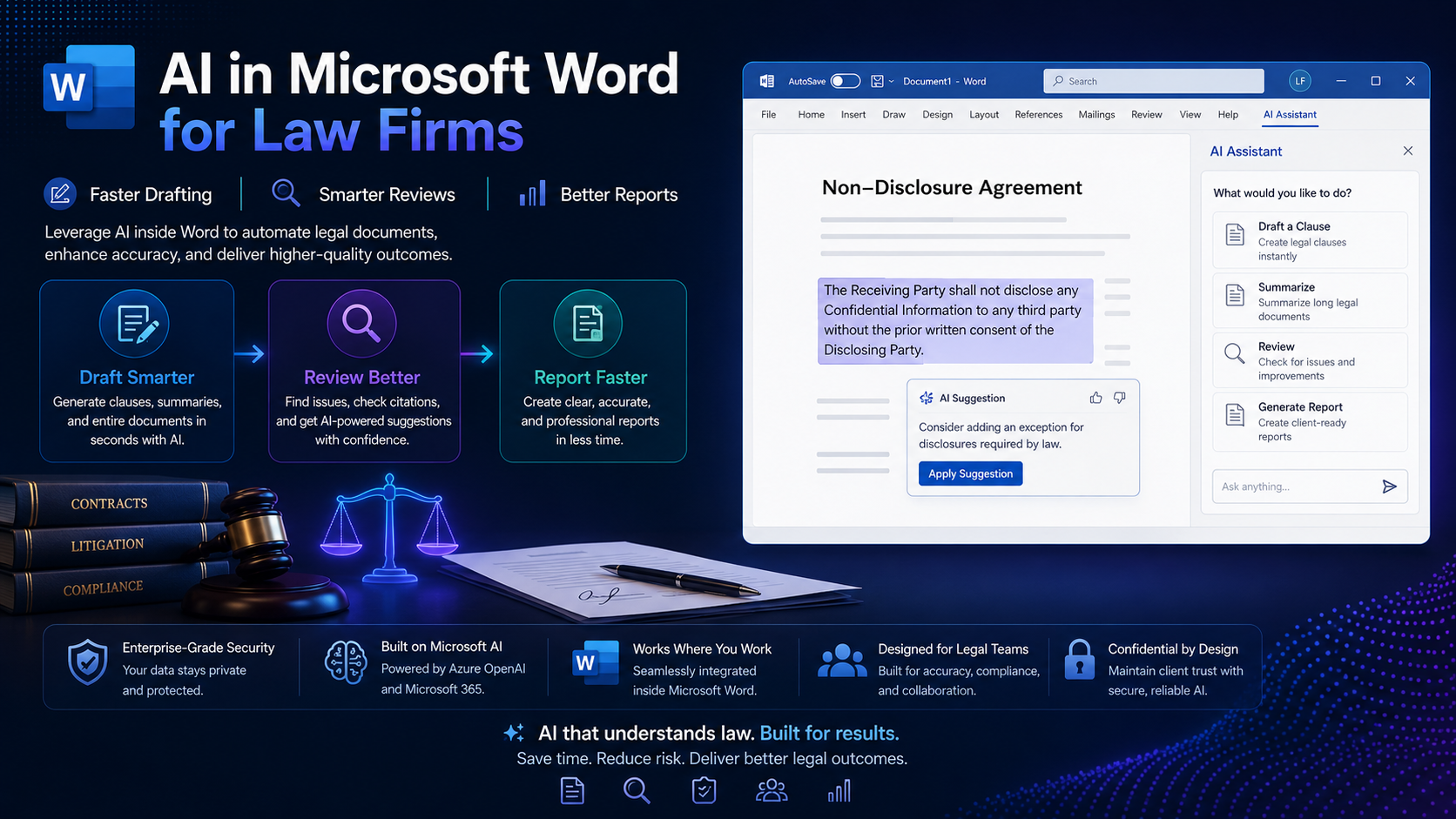
- Drafting first-pass clauses and whole documents from a short prompt or an intake form.
- Suggesting redlines and flagging risky or non-standard language against your playbook.
- Checking a document for internal consistency — defined terms, cross-references, party names.
- Summarising long agreements into plain-English briefs for clients or partners.
- Turning matter data into structured reports: status updates, obligation trackers, due-diligence findings.
Notice what is *not* on that list: making final decisions. Every one of these is a draft a human reviews. That framing matters, and it should be built into the tool.
How an AI Word Add-in Works
Under the hood it is simpler than it looks. The add-in is a task pane built with Office.js that reads the relevant part of the document, sends it to your firm’s chosen AI model through a secure backend, and inserts the response back into Word as tracked changes or a suggested draft. The lawyer stays in control the whole time.
Never call the model straight from the client
Drafting from a Prompt or Template
The everyday win is drafting. A lawyer selects a heading, types “add a mutual confidentiality clause, 3-year term, carve-out for public information,” and the add-in inserts a first draft in the firm’s house style — as a tracked insertion, so nothing lands in the document without a review.
async function draftClause(instruction) {
  // Give the model the surrounding text for context, not the whole file.
  const context = await getSelectionContext();

  const res = await fetch('https://your-backend.com/ai/draft', {
    method: 'POST',
    headers: { 'Content-Type': 'application/json' },
    body: JSON.stringify({ instruction, context }),
  });
  const { text } = await res.json();

  await Word.run(async (ctx) => {
    // Insert as a tracked change so a human reviews before it's accepted.
    ctx.document.trackRevisions = true;
    const range = ctx.document.getSelection();
    range.insertText(text, Word.InsertLocation.replace);
    await ctx.sync();
  });
}
Reviewing and Redlining Clauses
Review is where AI earns real trust. Point the add-in at a clause and ask it to compare against your playbook — the positions your firm will and won’t accept. It comes back with plain-language flags: “Indemnity is uncapped; your standard is 12 months’ fees,” with a suggested edit the lawyer can accept, tweak, or ignore.
Encode your playbook
Generating Reports and Summaries
Beyond single clauses, the same add-in can read an entire agreement — or a folder of them — and produce the documents everyone actually asks for: a one-page summary for the client, an obligations-and-deadlines table for the matter file, or a due-diligence report highlighting change-of-control and termination triggers across a stack of contracts.
async function summariseDocument(style) {
  const fullText = await getDocumentText();

  const res = await fetch('https://your-backend.com/ai/summarise', {
    method: 'POST',
    headers: { 'Content-Type': 'application/json' },
    body: JSON.stringify({ text: fullText, style }), // 'client-brief' | 'obligations' | 'risk'
  });
  const { summary } = await res.json();

  await Word.run(async (ctx) => {
    ctx.document.body.insertParagraph(summary, Word.InsertLocation.start);
    await ctx.sync();
  });
}
What used to be a billable-hour chore becomes a first draft in seconds — which the lawyer then refines. The time saved is real, and so is the consistency: every report follows the same structure.
Keeping Client Data Confidential
For a law firm, confidentiality isn’t a feature — it’s the whole job. Any AI add-in has to be built with that first. In practice that means routing requests through infrastructure you control, choosing a model provider that contractually won’t train on your data, and being deliberate about what leaves the building.
- Use an enterprise AI endpoint with a no-training, no-retention data agreement.
- Send only the text the task needs, and offer a redaction step for the most sensitive matters.
- Keep API keys, prompts, and logs on your own secured backend, encrypted in transit and at rest.
- Log every request for audit, and let firm admins control who can use which features.
- Make “human reviews everything” a hard rule — AI drafts, lawyers decide.
Getting Started
You don’t need to boil the ocean. The firms that succeed pick one painful, high-volume task — usually NDA drafting or first-pass contract review — and ship an add-in that does just that well. Once lawyers feel the time come back, expanding into reports and playbook reviews is an easy sell.
Conclusion
AI inside Word gives legal teams a quiet, capable assistant that lives exactly where the work already happens. It drafts, it flags, it summarises — and it always hands the final call back to a lawyer. Done thoughtfully, with confidentiality built in from day one, it doesn’t change how good work gets done. It just clears away the parts that were never the point. If your firm is ready to explore a secure, custom AI Word add-in tailored to your playbook, we’d love to help you build it.