Integrate QuickBooks with Google Sheets: Live Financial Reports with Apps Script
Pull live QuickBooks Online data into Google Sheets with a custom Apps Script add-on — sync invoices, customers, and Profit & Loss reports, and refresh your numbers on demand.
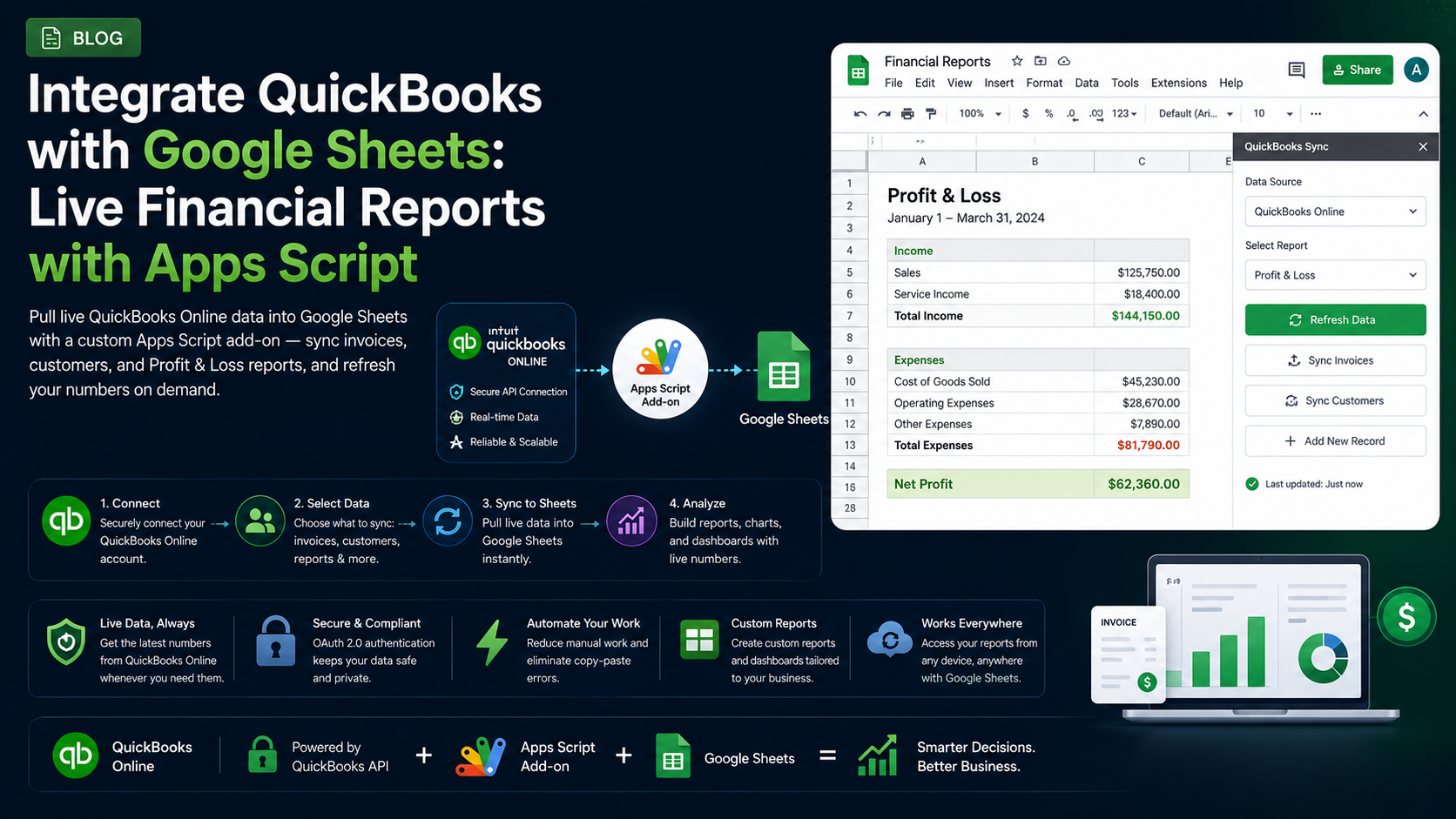
Introduction
QuickBooks is where the books live, but Google Sheets is where finance teams actually think. It’s where budgets get modelled, board packs get built, and numbers get sliced in ways no fixed accounting report allows. The problem is the handoff: exporting CSVs from QuickBooks, pasting them into Sheets, and discovering the figures were stale the moment they downloaded.
A custom Google Sheets add-on fixes that. Built with Apps Script, it pulls live data straight from your QuickBooks Online company into the spreadsheet — so you get the flexibility of Sheets with numbers that are always current, and a “Refresh” button instead of a manual export ritual.
Why Connect QuickBooks to Google Sheets?
- Refresh invoices, bills, and customer balances on demand instead of re-exporting CSVs.
- Build custom management reports and dashboards QuickBooks can’t produce natively.
- Combine accounting data with other sources — sales, payroll, inventory — in one model.
- Automate recurring reporting with scheduled refreshes.
- Give stakeholders self-serve, always-current numbers without QuickBooks logins.
How the Integration Works
Apps Script is Google’s serverless JavaScript platform that runs inside Google Workspace — no servers of your own to maintain. Your add-on uses UrlFetchApp to call the QuickBooks Online API, handles the OAuth 2.0 handshake with Intuit, and writes the returned JSON into the sheet with SpreadsheetApp. A custom menu or sidebar gives users the controls.
What You Can Pull from QuickBooks
- Invoices, bills, payments, and credit memos
- Customers and vendors with their balances
- The chart of accounts and journal entries
- Items, classes, and departments for segmentation
- Reports: Profit & Loss, Balance Sheet, Aged Receivables/Payables, Trial Balance
Setting Up the Apps Script Project
Create a container-bound or standalone Apps Script project, then add a custom menu so users can open the tools. The OnOpen trigger wires it into the Sheets UI.
function onOpen() {
  SpreadsheetApp.getUi()
    .createMenu('QuickBooks')
    .addItem('Connect', 'showAuthSidebar')
    .addItem('Refresh Invoices', 'importInvoices')
    .addItem('Import Profit & Loss', 'importProfitAndLoss')
    .addToUi();
}
Authenticating with OAuth 2.0
Register an app on the Intuit Developer portal to get a client id and secret, then use the community Apps Script OAuth2 library to manage the token flow. Store credentials in Script Properties — never hard-code them.
function getQuickBooksService() {
  const props = PropertiesService.getScriptProperties();
  return OAuth2.createService('quickbooks')
    .setAuthorizationBaseUrl('https://appcenter.intuit.com/connect/oauth2')
    .setTokenUrl('https://oauth.platform.intuit.com/oauth2/v1/tokens/bearer')
    .setClientId(props.getProperty('QB_CLIENT_ID'))
    .setClientSecret(props.getProperty('QB_CLIENT_SECRET'))
    .setScope('com.intuit.quickbooks.accounting')
    .setCallbackFunction('authCallback')
    .setPropertyStore(PropertiesService.getUserProperties());
}
Keep secrets in Script Properties
Fetching Data from the QuickBooks API
With a valid token, call the API with UrlFetchApp. Entities are queried with a SQL-like query string against your company (realm) id.
function fetchInvoices() {
  const service = getQuickBooksService();
  const realmId = PropertiesService.getScriptProperties().getProperty('QB_REALM_ID');
  const query = encodeURIComponent('SELECT * FROM Invoice MAXRESULTS 100');
  const url = `https://quickbooks.api.intuit.com/v3/company/${realmId}/query?query=${query}`;

  const res = UrlFetchApp.fetch(url, {
    headers: {
      Authorization: 'Bearer ' + service.getAccessToken(),
      Accept: 'application/json',
    },
    muteHttpExceptions: true,
  });

  return JSON.parse(res.getContentText()).QueryResponse.Invoice || [];
}
Writing Live Data into Sheets
Build a 2D array in memory and write it in a single setValues() call — that’s far faster than writing cell by cell and keeps the add-on responsive.
function importInvoices() {
  const invoices = fetchInvoices();
  const sheet = SpreadsheetApp.getActiveSpreadsheet()
    .getSheetByName('Invoices') ||
    SpreadsheetApp.getActiveSpreadsheet().insertSheet('Invoices');

  sheet.clearContents();
  const header = ['Invoice #', 'Customer', 'Date', 'Due Date', 'Total', 'Balance'];
  const rows = invoices.map((inv) => [
    inv.DocNumber,
    inv.CustomerRef && inv.CustomerRef.name,
    inv.TxnDate,
    inv.DueDate,
    inv.TotalAmt,
    inv.Balance,
  ]);

  sheet.getRange(1, 1, rows.length + 1, header.length)
    .setValues([header, ...rows]);
}
Use a custom function sparingly
Building Reports & Scheduling Refresh
The Reports endpoints return fully calculated statements, so you don’t re-derive the numbers. Request a Profit & Loss for a date range and lay it out in Sheets. Then add a time-driven trigger to refresh everything on a schedule — say, every morning before the team logs in.
function scheduleDailyRefresh() {
  ScriptApp.newTrigger('importInvoices')
    .timeBased()
    .everyDays(1)
    .atHour(6)
    .create();
}
Security & Best Practices
- Store the Intuit client secret in Script Properties and tokens in User Properties.
- Request only the accounting scope your add-on needs, and prefer read-only where possible.
- Refresh access tokens automatically and handle expiry with the OAuth2 library.
- Add muteHttpExceptions and check response codes so a failed call fails gracefully.
- Cache responses and batch requests to stay within QuickBooks rate limits.
Conclusion
A QuickBooks-to-Sheets add-on gives finance teams the best of both worlds: authoritative, real-time accounting data inside the tool they already use to analyse and report. Start with one high-value dataset — live invoices or a Profit & Loss — prove the workflow, then expand into full reporting and scheduled refreshes. If you’d like a secure, production-ready QuickBooks add-on built for your team, we’re happy to help.
Related Articles
 Google WorkspaceGetting Started with Google Apps Script for Workspace Add-onsSeptember 5, 2024 · 7 min read
 Google WorkspaceBuild a Gmail Add-on with Apps Script: A Step-by-Step GuideApril 15, 2025 · 8 min read
 Google WorkspaceGoogle Sheets Custom Functions with Apps Script: A Complete GuideMay 5, 2025 · 8 min read