Integrate Xero with Excel: Build a Custom Add-in for Live Accounting Data & Reports
Connect Xero cloud accounting to Excel with a custom Office.js add-in — pull live invoices, contacts, and financial reports, then automate reconciliation and reporting.
Introduction
Xero is one of the world’s most popular cloud accounting platforms, trusted by millions of small businesses and their advisors to manage invoicing, bank reconciliation, and financial reporting. But finance teams still live in Excel — it’s where budgets are modelled, board packs are built, and numbers are sliced in ways no fixed report can match.
A custom Excel add-in bridges the two: it pulls live data straight from your Xero organisation into the workbook, so you get the flexibility of a spreadsheet with the accuracy of your accounting system — no more manual CSV exports that are stale the moment they’re downloaded.
Why Integrate Xero with Excel?
- Refresh invoices, bills, and bank transactions on demand instead of re-exporting CSVs.
- Build custom management reports and board packs that Xero’s standard reports can’t produce.
- Automate month-end reconciliations and variance analysis inside familiar spreadsheets.
- Combine Xero data with other sources (CRM, inventory, payroll) in one model.
- Give non-accountants self-serve, always-current numbers without Xero logins.
How the Integration Works
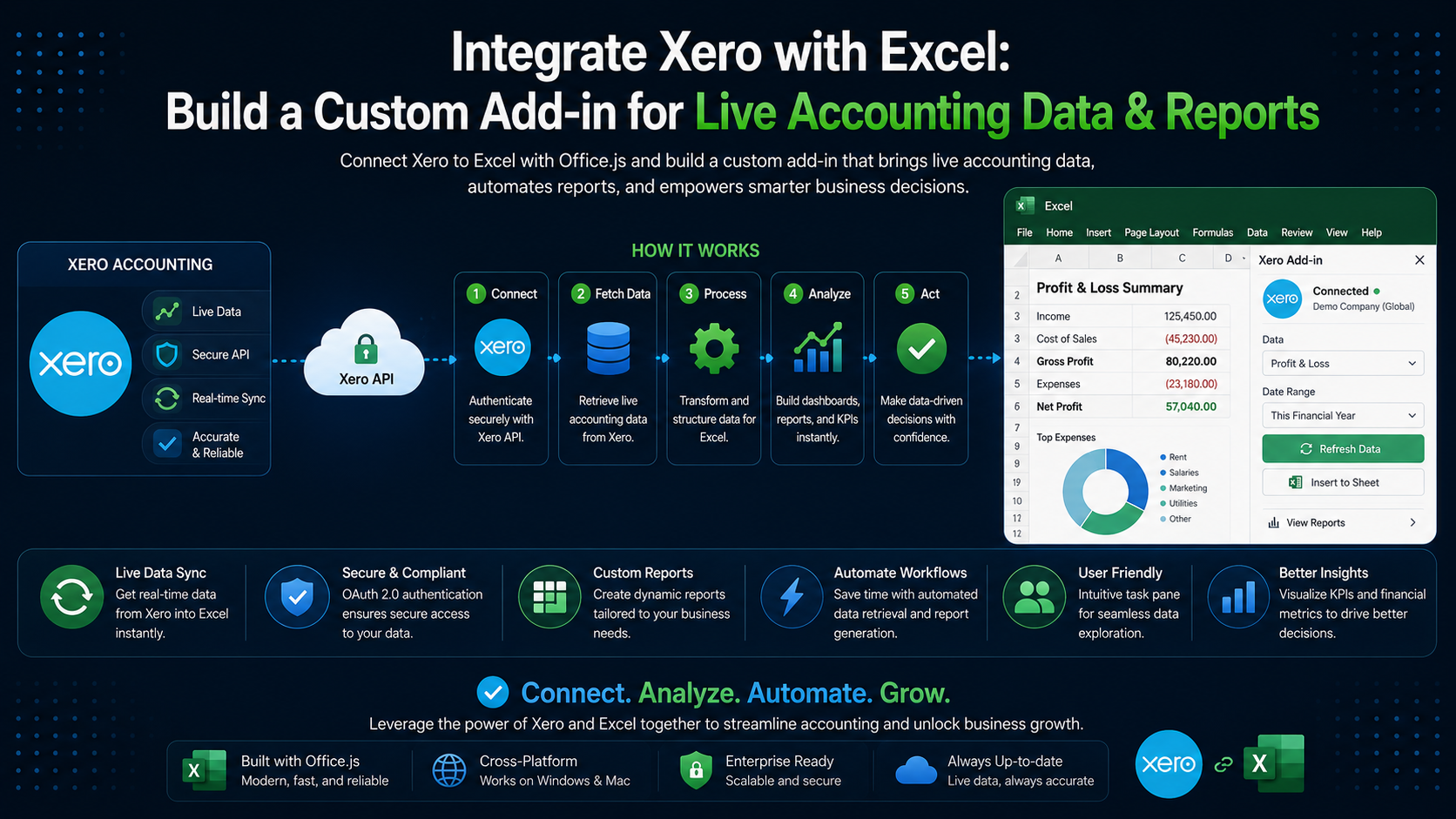
The add-in itself is an Office.js task pane — HTML, JavaScript, and the Excel API. It never talks to Xero directly. Instead it calls a small backend service you host, which holds your Xero app credentials, performs the OAuth 2.0 handshake, and proxies requests to the Xero Accounting API. The backend returns clean JSON, and the add-in writes it into worksheets.
What You Can Pull from Xero
- Sales invoices, purchase bills, and credit notes
- Contacts (customers and suppliers) and their balances
- Bank accounts and bank transactions for reconciliation
- The chart of accounts and manual journals
- Financial reports: Profit & Loss, Balance Sheet, Aged Receivables/Payables, Trial Balance
- Tracking categories, budgets, and tax rates
Authenticating with OAuth 2.0
Xero uses the OAuth 2.0 authorization-code flow. The user connects their Xero organisation once; your backend exchanges the code for access and refresh tokens and stores them securely. From the add-in, kick off that flow using the Office Dialog API so the consent screen opens in a controlled popup.
// Launch the Xero consent flow hosted by your backend, in an Office dialog.
Office.context.ui.displayDialogAsync(
  'https://your-backend.com/xero/connect',
  { height: 60, width: 40 },
  (result) => {
    const dialog = result.value;
    dialog.addEventHandler(Office.EventType.DialogMessageReceived, (arg) => {
      // Your backend posts back a short-lived session token, NOT the Xero tokens.
      sessionStorage.setItem('xeroSession', arg.message);
      dialog.close();
    });
  }
);
Never ship secrets to the client
Fetching Data from the Xero API
With a session established, the add-in requests data from your backend, which forwards the call to Xero with the stored access token and returns the JSON response.
async function getInvoices(status = 'AUTHORISED') {
  const token = sessionStorage.getItem('xeroSession');
  const res = await fetch(
    `https://your-backend.com/xero/Invoices?status=${status}`,
    { headers: { Authorization: `Bearer ${token}` } }
  );
  if (!res.ok) throw new Error('Failed to load invoices from Xero');
  const { Invoices } = await res.json();
  return Invoices;
}
Writing Live Data into Excel
Once you have the records, use the Excel API to drop them into a worksheet as a table. Build the values array in memory and write it in a single range.values assignment to keep it fast.
await Excel.run(async (context) => {
  const sheet = context.workbook.worksheets.getActiveWorksheet();
  const invoices = await getInvoices();

  const header = ['Invoice #', 'Contact', 'Date', 'Due Date', 'Total', 'Status'];
  const rows = invoices.map((inv) => [
    inv.InvoiceNumber,
    inv.Contact.Name,
    inv.DateString,
    inv.DueDateString,
    inv.Total,
    inv.Status,
  ]);

  const range = sheet.getRangeByIndexes(0, 0, rows.length + 1, header.length);
  range.values = [header, ...rows];
  sheet.getUsedRange().format.autofitColumns();
  await context.sync();
});
Turn it into a formula
=XERO.BALANCE("Sales") — so finance users can pull live figures straight into their own models without touching the task pane.Building Financial Reports
Xero’s Reports endpoints return fully calculated statements, so you don’t have to re-derive the numbers. Request a Profit & Loss for a date range and lay it out in Excel exactly how your stakeholders expect.
async function getProfitAndLoss(fromDate, toDate) {
  const token = sessionStorage.getItem('xeroSession');
  const res = await fetch(
    `https://your-backend.com/xero/Reports/ProfitAndLoss?fromDate=${fromDate}&toDate=${toDate}`,
    { headers: { Authorization: `Bearer ${token}` } }
  );
  const { Reports } = await res.json();
  return Reports[0]; // rows -> sections -> cells, ready to map into the sheet
}
The same pattern covers the Balance Sheet, Aged Receivables, and Trial Balance — giving you a one-click, always-current reporting pack that refreshes whenever the numbers change in Xero.
Automating Refresh & Reconciliation
Add a “Refresh” button to the task pane that re-pulls each dataset and rewrites its sheet, and a reconciliation view that compares Xero bank transactions against an imported statement to flag mismatches. Because everything is live, month-end becomes a review step rather than a data-gathering marathon.
Respect the rate limits
Security & Best Practices
- Keep Xero client secrets and OAuth tokens server-side only; encrypt them at rest.
- Request the minimum Xero scopes your features need (e.g. read-only where possible).
- Refresh access tokens on the server and handle the 30-minute expiry transparently.
- Serve every endpoint over HTTPS and validate the add-in’s session token on each call.
- Batch and cache API responses to respect rate limits and keep the task pane snappy.
Conclusion
A Xero-to-Excel add-in gives finance teams the best of both worlds: authoritative, real-time accounting data inside the tool they already use to analyse and report. Start with a single high-value dataset — live invoices or a Profit & Loss — prove the workflow, then expand into full reporting and reconciliation. If you’d like a secure, production-ready integration built for your organisation, our team can help.